
NovelsReader
HK IReader Technology LimitedBooks & Reference
2.7135.00 Reviews
- Version
- 10.8.60
- Installs
- 100.00K
- Age Rating
- Mature 17+
Screenshots

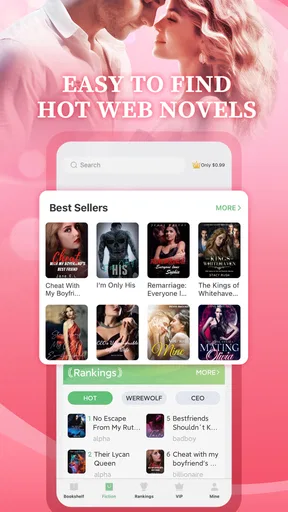
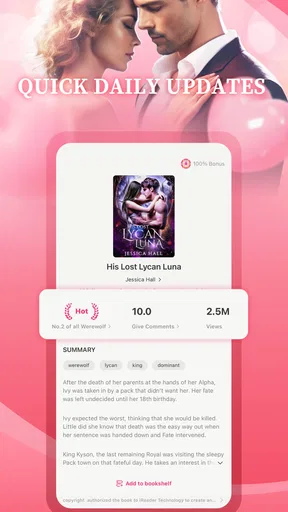
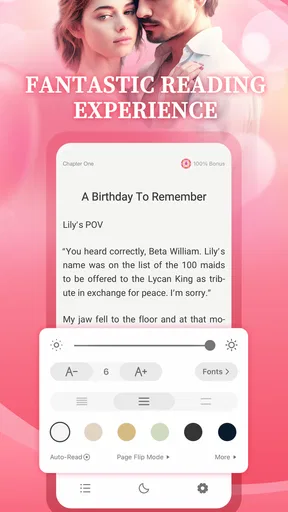
Our Review of NovelsReader
 Analysis by Appyee
I approached NovelsReader as a reader deciding whether one more novel app deserved a place on my phone. Its promise is straightforward: a free Books & Reference app centered on romance novels, rather than a broad digital library or a general-purpose reading tool. That focus matters. If you regularly want serialized love stories and prefer discovering your next read inside one dedicated catalog, the app has a clear reason to exist. If you mainly read books you already own, need a polished e-reader for public-domain files, or dislike mature romantic fiction, the fit is much less obvious.
The app comes from HK IReader Technology Limited and is available for Android devices running version 7.0 or later. It is free to install, although individual in-app purchases range from $1.49 to $129.99. That combination tells me to judge it less like a single paid book and more like a reading service: the important question is not simply whether installation costs anything, but whether the way stories are presented and unlocked suits my reading habits.
How I would decide whether NovelsReader fits
My first decision criterion would be genre commitment. NovelsReader is not trying to be a neutral shelf for every kind of literature. Its identity is built around romance novels, so I would choose it when I want emotional tension, relationship-driven plots, and the convenience of browsing within that mood. I would not install it expecting the breadth of a library app, a technical reference collection, or a tool for importing my own reading files.
The second criterion is how I read. Some people finish a complete book in a weekend and want a simple purchase with no interruptions. Others enjoy returning to a story in short sessions, following several ongoing plots, and sampling different premises before settling on one. A romance-focused catalog can be more useful for the second group, especially when the reader wants a steady stream of new stories instead of repeatedly searching across unrelated shelves.
I would also pay attention to tolerance for the app’s mature audience positioning. The content rating is Mature 17+, so this is not an app I would install on a child’s device or recommend as a general family reading option. That rating should shape expectations before browsing, not after a story has already become a regular part of someone’s routine.
Finally, I would consider the cost model carefully. The free entry point makes trying the app easy, but the presence of purchases means that a long reading session can turn into a spending decision. My practical advice is to treat every unlock as a separate choice, keep track of what I am willing to spend on one story, and avoid paying simply because I have already invested time in earlier chapters. The cheapest way to use a serialized reading app is to decide a budget before the story becomes emotionally difficult to leave.
What the first session tells me
In a first session, I would not immediately commit to the most attractive cover or the most dramatic description. I would sample several openings and compare the writing style, pacing, and chapter length. Romance fiction can vary sharply from one title to another, and a strong premise does not guarantee that the narration will suit me. This small test is more useful than judging the entire service from one story.
I would also create a simple reading routine. For example, I might use NovelsReader during a commute, before bed, or during short waiting periods, while keeping one main story rather than opening every promising title. That approach reduces the feeling of an endless catalog and makes it easier to notice whether the app genuinely improves my reading time.
One useful habit is to stop at a natural pause before switching titles. Serialized fiction often encourages rapid chapter-to-chapter reading, but pausing after a completed scene gives me a better sense of whether I enjoy the story itself or merely want to resolve a cliffhanger. That distinction becomes important when purchases are involved.
Where the focused catalog wins
The strongest case for NovelsReader is convenience for readers who already know they want romance. A general bookstore may offer more genres, but that variety can add friction when I only want relationship-centered fiction. Here, the narrower purpose can make discovery feel more direct: I can open the app with a particular mood in mind instead of filtering through unrelated nonfiction, comics, manuals, and reference titles.
It also suits readers who enjoy browsing by premise. Romance readers often choose based on a setup, a character dynamic, or the emotional question behind the story. A dedicated app gives that kind of browsing more relevance than a broad reading application. I can evaluate several possibilities quickly, then keep the one whose opening actually earns my attention.
Another advantage is the low-risk entry. Since the app is free, I can test its reading experience without first buying a complete title. That is especially useful for someone unsure whether a romance-focused catalog belongs in their routine. The free installation does not remove all cost considerations, but it lowers the barrier to evaluating the interface and the available stories.
The app’s scale also suggests that it has found an audience beyond a tiny experiment. It has passed 100K installs, which makes it more established than a completely unknown reading utility. I would still treat popularity as context rather than proof of quality, particularly because the average rating is 2.7 from around 327 ratings. That mixed reception is a reason to test the experience personally and read recent user comments before investing heavily.
For me, the rating is not an automatic rejection. Reading preferences are unusually personal, and a complaint from someone seeking a different genre or business model may not apply to me. Still, it is a warning against assuming that the app will feel perfect for everyone. I would begin with a short trial, check how comfortably I can navigate and read, and only then decide whether it deserves regular use.
Three practical ways to get more from it
My first practical tip would be to use a “sample before commitment” rule. I would try the opening portions of more than one romance novel, compare how quickly each story establishes its conflict, and choose based on sustained interest rather than a single dramatic hook. This protects both my time and my purchase budget.
My second tip is to separate discovery from reading. I would browse when I have a few spare minutes, but read only one or two selected stories during my main session. Mixing discovery with active reading can make a catalog feel distracting, particularly when every new premise seems more exciting than the current chapter. A small shortlist gives me control without losing the pleasure of exploration.
My third tip concerns spending. I would record the title I am reading and the amount I have chosen to allow for it, even if the first interaction feels inexpensive. The listed purchase range reaches from $1.49 to $129.99 per item, so the difference between a casual unlock and a major purchase is substantial. I would never assume that “free” means the complete reading journey will remain free.
A fourth useful test is to read in the conditions where I expect to use the app most. If I want bedtime reading, I would check whether the screen and text presentation feel comfortable in a dim room. If I want short commute sessions, I would see whether returning to a story feels straightforward. These are personal workflow tests, but they reveal more than a quick glance at the store summary.
Where another type of reading app may fit better
NovelsReader is not automatically the best alternative to every reading service. A public library app may be a better choice for someone who wants to borrow complete books through an existing library membership. A general e-book store may suit readers who want to buy individual finished titles and keep their collection organized around authors rather than serialized discovery. An e-reader app for personal files is the more logical option for someone who already owns documents and wants one place to open them.
Those alternatives solve different problems, so I would not compare them only by the number of books they appear to offer. NovelsReader’s advantage is focus. A library service’s advantage may be borrowing, while a general e-book store may be better for readers who want a familiar purchase-and-read process. Without needing every app to behave the same way, I can choose based on whether I value romance discovery, ownership, borrowing, or personal-file support most.
I would also skip NovelsReader if mature romantic content is not appropriate for my household. The 17+ rating is a meaningful boundary, not a minor label. Parents looking for children’s reading, educators preparing a shared classroom device, or anyone wanting broadly suitable family content should choose a different category of app.
Readers who dislike cliffhangers should think twice as well. Serialized romance can be rewarding when I enjoy anticipation, but frustrating when I want a complete narrative in one sitting. In that case, a service built around finished books may create less pressure and make the total cost easier to understand before reading begins.
The cost of switching from another reading habit
Moving to NovelsReader is easy at the installation level because there is no upfront app price. The harder part is changing how I choose and finish books. If I currently read complete novels, I may need to become comfortable with a more episodic rhythm. If I use a library app, I may need to rethink borrowing as a predictable alternative to individual purchases. If I read saved files, I may gain a romance catalog but lose the simplicity of keeping everything in one personal collection.
That change is worth making only if the catalog’s focus solves a real problem for me. I would not switch just because the app is free. I would switch if I often waste time searching for romance stories elsewhere, enjoy sampling new plots, and am comfortable managing purchases one decision at a time.
Before making it my main reading app, I would run a short comparison. I would choose one evening to browse NovelsReader, another to use my usual reading option, and then ask which session gave me better value: more enjoyment, less searching, clearer spending, or a more comfortable return to the story. This is a better test than assuming that a dedicated category is automatically superior.
The current version is 10.8.60, and the app was released on March 25, 2024. Those details help place the product in context, but they do not replace hands-on judgment. I would keep the app updated through the normal store process and reassess it after regular use, especially if navigation, reading comfort, or purchase decisions become a source of friction.
Who I would recommend it to
I would recommend NovelsReader to an adult reader who actively seeks romance novels, enjoys trying new serialized stories, and wants a free way to explore a dedicated catalog before deciding how much to spend. It is particularly suitable for short reading sessions: a few chapters during a break, a story continuation while traveling, or a quiet evening when I want relationship-focused fiction without browsing a general store.
I would recommend starting cautiously rather than treating it as an unlimited free library. Read enough of a title to judge the writing, decide on a personal spending limit, and keep track of which stories are genuinely worth continuing. That approach preserves the app’s strongest benefit—easy romance discovery—without allowing the purchase structure to dictate my reading choices.
I would not recommend it to children, to readers seeking all-ages material, or to someone whose priority is borrowing complete books at no additional reading cost. I would also point a highly selective reader toward a broader e-book or library alternative if they want established authors, finished editions, or a collection built around books they already own.
My final view is cautiously positive for the right audience. The combination of a romance-first purpose and free installation makes NovelsReader worth testing, but the modest 2.7 average means I would not present it as a universal recommendation. For me, its value depends on whether the focused catalog saves time and whether I can manage the purchase choices with discipline. If those conditions match your habits, it can become a convenient companion for episodic romance reading. If they do not, a library, general e-book, or personal-file reader will probably be the better long-term choice.
Verdict
Strengths of NovelsReader
- Clean reading interface with comfortable text spacing and themes.
- Supports long-form reading without unnecessary distractions.
- Easy to browse and organize novels in one place.
- Useful for readers who prefer mobile access to fiction.
- Simple controls make the app approachable for new users.
Limitations of NovelsReader
- Novel availability may vary by region or catalog updates.
- Some titles may require an internet connection to access.
- Reading preferences may be limited compared with dedicated e-readers.
- The app may feel basic for users wanting advanced library tools.
- Ads or optional purchases could affect the reading experience.
Other Releases by HK IReader Technology Limited
View All
PopoVibe: Shorts, Big Vibe
Entertainment4.4

NovelZoom
Books & Reference2.5

NovelNest
Books & Reference4.6
Similar Picks in This Category
View All
Google Play Books & Audiobooks
Google LLC4.7

네이버 - NAVER
NAVER Corp.3.5

Wattpad - Read & Write Stories
Wattpad.com3.7

King James Bible - Verse+Audio
Ozion4.8

Bible Offline-KJV Holy Bible
Bíblia Offline4.9

Amazon Kindle: Reading App
Amazon Mobile LLC4.8
Frequently Asked Questions
What is NovelsReader and what can I use it for?
NovelsReader is a reading app designed for people who enjoy accessing and reading novels on a mobile device. It typically provides a digital library, reading interface, browsing tools, and options for organizing books. Before downloading, users should check whether the available catalog matches their preferred genres and languages, since selection and availability may vary by region or app version.
Is NovelsReader free to download and use?
NovelsReader may be available as a free download, but some books, features, or reading options could require in-app purchases, a subscription, or account registration. Users should review the pricing information shown in the Google Play Store or Apple App Store before installing it. It is also worth checking whether the app includes advertisements or offers optional premium content.
Does NovelsReader work offline?
Offline reading depends on how NovelsReader handles book downloads and content access. If the app supports downloading novels, users may be able to continue reading without an internet connection after saving a title to the device. However, browsing the catalog, synchronizing progress, receiving updates, or opening restricted content may still require connectivity, so this should be confirmed in the app settings.
What reading and personalization features does NovelsReader offer?
NovelsReader is expected to include standard mobile reading tools such as adjustable text size, themes or brightness controls, bookmarks, reading history, and progress tracking. The exact feature set can differ between Android and iOS versions. Readers who need advanced customization should explore the settings after installation to confirm support for preferred fonts, screen orientation, page layouts, and library organization.
Is NovelsReader safe and suitable for all readers?
Before installing NovelsReader, users should review its developer information, permissions, privacy policy, and recent store reviews. The app may request access needed for account management, notifications, or downloaded content, but unnecessary permissions should be treated cautiously. Content suitability can also vary because novels may include mature themes, romance, violence, or other subjects that are not appropriate for every age group.
